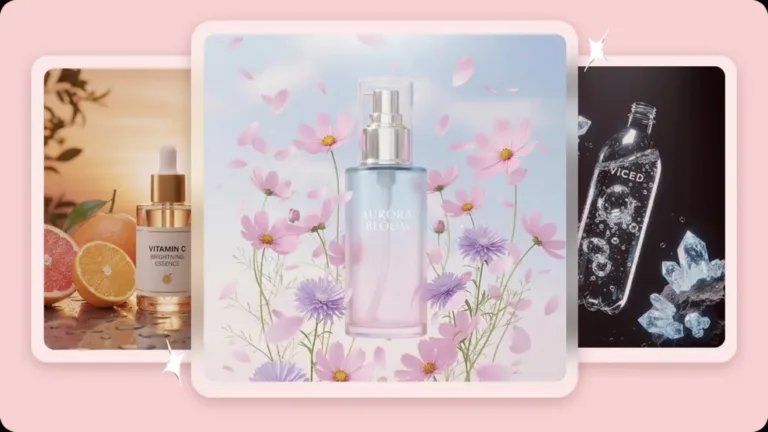
A product launch lives or dies on momentum, and visuals are what build that momentum long before the product itself is available to touch. Teaser images, reveal moments, hero shots for the actual release- each needs a distinct visual treatment while still feeling like part of the same unfolding story. Producing all of that traditionally meant multiple photoshoots spread across weeks. An AI image generator compresses that entire visual campaign into something a small team, or even one person, can genuinely pull off.
Dreamina, running on its most advanced image generation model, Seedream 5.0 Pro, has become a genuinely capable partner for building out a full launch’s visual arc. Here’s how to plan and generate a campaign that actually builds anticipation instead of just announcing a release.
Mapping a launch’s visual arc before generating anything
A strong product launch campaign typically moves through distinct visual phases, and each one needs a different mood and level of information:
- Teaser phase — mysterious, partial glimpses that build curiosity
- Reveal phase — the full product shown clearly for the first time
- Launch phase — polished hero imagery ready for wide release
- Post-launch phase — lifestyle and social proof imagery showing real use
Planning this arc before generating a single image keeps the campaign feeling like a deliberate story rather than a scattered pile of unrelated visuals.
The teaser phase: give away just enough
Teaser visuals work by withholding information deliberately. A product silhouette obscured by shadow, smoke, or motion blur, a close crop showing only one distinctive detail, a dramatic lighting setup that hints at shape without fully revealing it, all create curiosity without answering the obvious question of what’s actually launching. The goal here isn’t clarity, it’s intrigue.
The reveal phase: clarity with impact
Once teasers have done their job, the reveal needs to deliver a genuine payoff. This is where the product should be shown clearly and dramatically for the first time, often with more intense lighting and a more centered, confident composition than a typical product shot would use. The reveal image needs to feel like a moment, not just documentation.
Meet Seedream 5.0 Pro: consistency across a full campaign arc
A handful of Seedream 5.0 Pro’s specific capabilities matter significantly when a single product needs to appear consistently across such different visual moods.
Multi-layer visual control for product consistency
Multi-layer visual control separates the product from its background and atmosphere, keeping it visually accurate whether it’s obscured in shadow for a teaser or fully lit for a hero shot.
Pinpoint precision editing for phase-specific detail
With point selection, lasso, sketch guidance, and regional controls, pinpoint precision editing lets you fine-tune exactly how much of the product is revealed or hidden at each stage of the campaign.
Deep reasoning generation for mood-appropriate consistency
Deep reasoning generation analyzes your prompt’s intent and visual relationships before producing an image, helping each phase’s distinct mood, mysterious, triumphant, polished, relatable, come through clearly and intentionally.
2K output for campaign-wide quality
Since launch visuals get used across everything from social teasers to press materials, 2K output quality ensures every phase of the campaign holds up to close inspection.
Your 3-step launch visual with Dreamina
With your campaign phase identified, here’s exactly how to generate the visual for it.
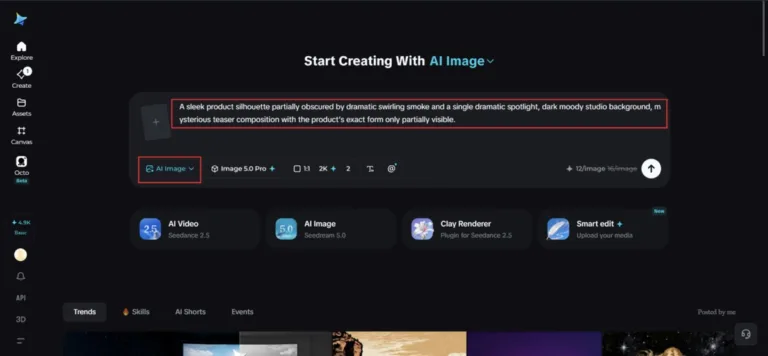
Step 1: Write a text prompt and/or add a reference image
Navigate to Dreamina and write a detailed text prompt describing a person dressed appropriately for your brand if your concept includes a figure, along with the product and the specific mood matching your launch phase. Upload a reference image of your actual product so Dreamina keeps its shape and details accurate throughout the campaign.
For example: A sleek product silhouette partially obscured by dramatic swirling smoke and a single dramatic spotlight, dark moody studio background, mysterious teaser composition with the product’s exact form only partially visible.
Being specific about how much of the product to reveal is what separates an effective teaser from a confusing one.
Step 2: Adjust parameters and generate
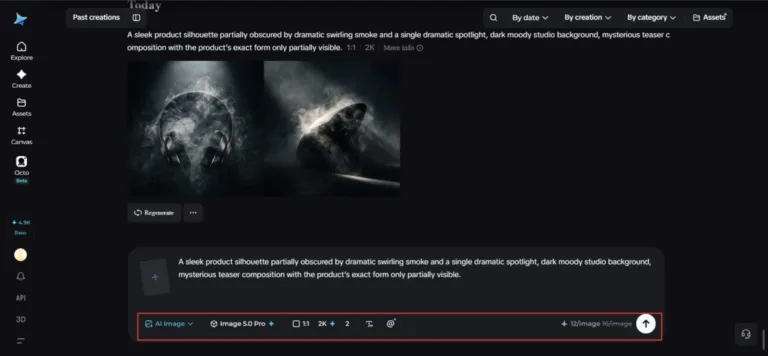
Before generating, set your parameters to match your specific launch phase and platform. Choose Image 5.0 Pro, powered by Seedream 5.0 Pro, as your model, then select your aspect ratio, image size, and resolution, matching format to platform for each phase, and using 2K resolution throughout so every stage of the campaign holds up at full quality. Click Dreamina’s generate icon to produce each visual.
Step 3: Customize and download
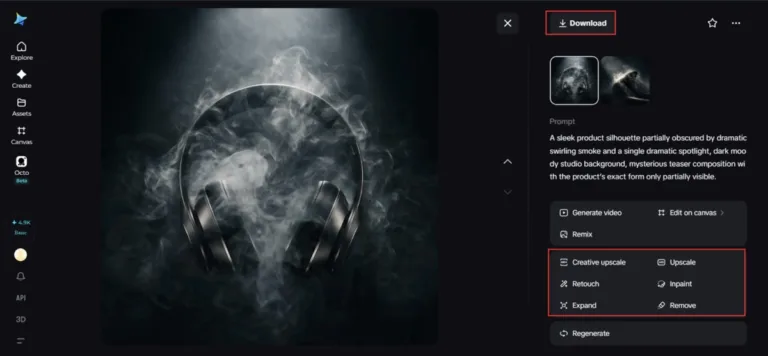
Once each visual generates, refine it using Dreamina’s AI customization tools — inpaint to adjust specific product or lighting details, expand to open up space for campaign copy, remove to eliminate anything distracting from the intended mood, and retouch to fine-tune contrast and polish for that phase. When it fits its role in the campaign, click the Download icon to save it.
The launch phase: hero imagery that carries the weight
Once the product is publicly known, launch-phase visuals shift toward polish and versatility, the kind of clean, striking hero shot that can anchor a website, an ad, or a press release. This is typically the most technically refined image in the whole campaign, since it needs to represent the product at its absolute best across the widest range of uses.
The post-launch phase: proving real-world relevance
After the initial excitement settles, campaign visuals often shift toward showing the product genuinely in use, lifestyle scenes, real contexts, a sense of the product fitting into everyday life rather than existing only in a dramatic studio setting. This phase reassures potential buyers who missed the initial hype that the product still matters.

Keeping the campaign visually connected
Even as mood shifts dramatically between teaser and post-launch phases, a shared visual thread, a consistent color grade, a recurring lighting quality, a signature composition habit, helps the whole campaign read as one connected story rather than disconnected images that happen to feature the same product.
Final thoughts
A product launch’s momentum is built visually long before the release date arrives, and mapping that arc deliberately, paired with the right AI image generator, makes the whole campaign achievable without a sprawling production budget.
With Dreamina and its advanced Seedream 5.0 Pro model, your product stays consistent while the mood around it shifts intentionally from mystery to reveal to real-world relevance.
Plan your campaign’s arc first, and let Dreamina bring each phase of the story into view!

Thomas Miller is the founder and Editor-in-Chief of Seat42F, covering television, movies and streaming entertainment. He launched Seat42F in 2007 and has spent nearly two decades covering the entertainment industry.