Getting stopped by a paywall in the middle of an exciting short drama can be annoying and frustrating, especially when you don’t know what you are paying for. Always know what you get for free and what the premium version really adds before you spend any money, so that you are prepared and can enjoy your shows without any surprise charges or interruptions. You should also check how the subscription works ahead of time, so you can decide right away if it’s worth it.
In this guide, we’ll go over what short dramas are, how DramaWave fits next to other streaming services, what the premium version adds, and how to manage your subscription the right way to avoid problems.
Short dramas, also called microdramas or vertical dramas, are stories that are filmed for a phone that you hold upright. Each episode usually runs about one to two minutes and ends with a cliffhanger, so it’s easy to keep tapping the next one. A full series often runs to dozens of episodes, and according to Sensor Tower, these stories lean on high-emotion genres such as romance, revenge and fantasy.
This format is growing fast. Sensor Tower reported that short-drama apps passed 850 million downloads in the first quarter of 2026, and even Peacock has announced short vertical dramas for its mobile app, including titles licensed from ReelShort.
How DramaWave Fits Next to Other Streaming Services
DramaWave isn’t a replacement for Netflix or Disney+, because those services are where you sit down for a 45-minute episode, while DramaWave is where you watch a few minutes while you’re waiting in line or before bed. Most mainstream services charge one monthly fee for the whole library, but DramaWave works differently, with a mix of free episodes, ads and paid VIP plans. The app is free to download, and its App Store listing shows weekly and monthly VIP memberships as in-app purchases, so make sure you know what you are paying for.
What You Get for Free
DramaWave is free to download, and the free version gives you limited access to selected titles. To keep watching a series past that point, you need a VIP plan. Free viewing also comes with ads, since ad-free streaming is one of the things VIP adds. That makes the free version a good way to sample a few stories and see whether the format suits you.
What the Premium Version Adds
According to the plan details listed for DramaWave, a VIP plan includes unlimited viewing, 1080p HD, ad-free streaming and offline downloads, and it also lists picture-in-picture, VIP-only dramas, exclusive clips and daily VIP points. AI Remix is listed for the weekly and monthly plans only, while VIP Pro has everything in VIP plus AI Roleplay, which lets you chat with characters.
Free vs VIP vs VIP Pro
| Feature | Free | VIP | VIP Pro |
| Later episodes | Limited access to selected titles | Unlimited viewing | Unlimited viewing |
| Ads | Yes | Ad-free | Ad-free |
| 1080p HD | – | Yes | Yes |
| Offline downloads | – | Yes | Yes |
| VIP-only dramas and exclusive clips | – | Yes | Yes |
| AI Remix | – | Weekly and monthly plans only | Weekly and monthly plans only |
| AI Roleplay | – | No | Yes |
Who Should Pay for Premium
Here are the things to think about before you decide:
- You’re in the middle of a long series. VIP’s unlimited viewing lets you watch the rest without limits.
- You watch every day. Daily viewers get the most out of ad-free viewing, since they would see the most ads.
- You like to watch offline. Downloads are useful for travel or places with a weak signal.
- You want the AI features. Only VIP Pro has AI Roleplay, so check that before you choose a tier.
Premium isn’t worth it if you only watch once or twice a month, so in that case the free version may be enough.
Comparing the Plans
Prices change by country, app store, tier and date, and two people can see different offers in the app, so check the price on your own in-app subscription page. Here are the things you should check before you pick a plan:
- Billing period. A weekly price looks small, but it renews often, so four weekly payments cost four times the weekly price.
- Cost per month. Multiply the weekly price by four and compare it with the monthly plan.
- Tier. Decide if you need VIP or the extra AI features in VIP Pro.
- Renewal price. Look at the price the plan renews at, not only the first payment.
- What’s covered. Check that the series you want to watch is included in your plan.
Avoid Fake Offers and Account Sharing
Fake offers are common around popular apps, so here are the things you should avoid:
- Modified apps and “free VIP” downloads. They can carry malware and may steal your login, so never install them.
- Free coin generators. These sites often ask for your password or payment details and give you nothing, so stay away from them.
- Cheap shared accounts. The seller can take the account back, change the password or disappear, and you lose your money.
- Strangers asking for your login. Sellers in comment sections or chat groups who ask you to send them your password are a red flag, so never send your login details to a stranger.
Only download the app itself from the official App Store or Google Play listing.
Another Option: LootBar
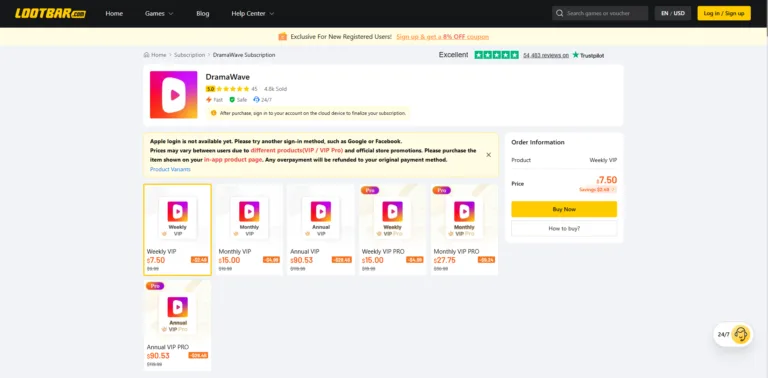
If you’d like another way to pay for Premium, you can buy the drama wave premium version on LootBar. It covers both VIP and VIP Pro in weekly, monthly and annual plans, often below the official price, and the membership is activated on your own DramaWave account in a few minutes rather than through a shared login. Activation currently works with Google or Facebook sign-in, not Apple. LootBar Subscriptions also lists memberships for several other apps.
Managing Your Subscription Safely
Here are the things you should do to avoid surprise charges:
- Set a reminder. Write the renewal date on your calendar so you don’t forget it.
- Cancel where you bought it. If you paid in the app through Apple, go to Settings, tap your name, then Subscriptions. If you paid through Google Play, go to Subscriptions in Google Play, select DramaWave and tap Cancel subscription. Deleting the app doesn’t cancel the plan.
- If you bought through LootBar, the page says to cancel from your LootBar account dashboard at least 48 hours before the plan ends.
- Keep your receipts. Save screenshots of your plan in case you need proof.
Conclusion
Knowing what DramaWave offers for free and what Premium adds can save you a lot of time and money, and it only takes a few minutes to check. DramaWave is a fun way to fill small gaps in your day, and the free version is enough if you only watch now and then. Premium is worth it if you watch often, don’t like ads, or want to finish a long series without limits.
Make sure to check what your plan covers, and set a reminder for the renewal date so you don’t forget it. Never share your password with strangers, and cancel in the same place where you bought it. Keep in mind that weekly plans cost more over time, so choose a plan length that matches how long you will actually watch and enjoy your stories.

Thomas Miller is the founder and Editor-in-Chief of Seat42F, covering television, movies and streaming entertainment. He launched Seat42F in 2007 and has spent nearly two decades covering the entertainment industry.