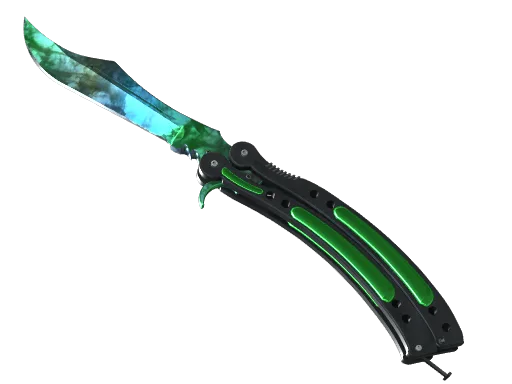
When I finally saved enough for a Butterfly Knife, I assumed the finish would be the hard choice. I settled on Gamma Doppler within a week, then spent almost a month deciding which phase I actually wanted.
That second decision caught me off guard. Every gamma doppler butterfly knife carries the same market name, yet Phase 1 and 4 can look like two different items once you open them in the inspect view. The phase is what I see every time the knife flips open, so I treated it as the real purchase.
Why the Phase Decides the Look
Gamma Doppler is a marbled, candy-coated finish, and the phase determines which colors that marbling produces. The paint seed then decides where those colors land on the blade.
Wear barely separates listings here. Butterfly Knife | Gamma Doppler only comes in Factory New and Minimal Wear with a Float Value range of 0.00 to 0.08 so the phase does almost all the visual work.
The finish comes in four numbered phases plus Emerald:
- Phase 1: Green with dark blue and purplish patches
- Phase 2: Bright, saturated green with teal tones and less darkness
- Phase 3: Teal and blue-green tones
- Phase 4: The bluest version, usually with some green mixed in
- Emerald: A deep, almost solid green priced far above the rest.
Gamma Doppler knives arrived as rare, special items in the Operation Riptide case, and Butterfly versions have been a popular pick ever since. That popularity means plenty of listings to compare, which helped me a lot.
How I Compared the Phases
I stopped relying on descriptions pretty quickly. A label like blue-green covers a lot of ground, so I built a short routine and ran every candidate through it.
Color Dominance
First, I asked which color dominated the blade. Two Phase 2 knives can both be green, but one might be almost entirely lime while another carries a wide, dark band along the spine. I wanted one color to clearly lead.
Pattern Coverage on the Blade
The Butterfly blade is long and narrow. On some listings, the brightest area sat near the tip and faded toward the pivot. On others, color ran the full length, which is what actually shows up on screen during matches.
Dark Patches and Handles
Phases 1 and 3 often carry darker areas. A little black adds depth, but if it covers roughly a quarter of the blade, the knife looks muddy on darker maps. I also checked how the finish looked around the handles, since the Butterfly shows plenty of them during inspect animations.
Here is how my notes looked after a couple of weeks of browsing:
| Phase | What I liked | What put me off |
| 1 | Lower price, moody look | Blue patches often dominate |
| 2 | Brightest regular green | Small premium over Phases 1 and 3 |
| 3 | Unusual teal shades | Colors shift a lot between patterns |
| 4 | Striking blue | Strong blue examples cost more |
| Emerald | Rich, even color | Far outside my budget |

The Phase I Chose and Why
I went with Phase 2. It gave me the brightest green with the smallest black areas, and on the listing I bought, the color covered the blade from pivot to tip. In-game, it reads clearly on almost every map, which was the whole point.
Budget shaped the decision too. Emerald was never realistic for me, and I preferred paying a modest premium for a clean Phase 2 over stretching for rarity I would barely notice mid-round.
If I were buying again, I would probably still pick Phase 2. That said, a Phase 4 with deep blue and minimal green would tempt me because it feels less expected. I would skip Phase 1 unless the pattern were unusually clean.
Where I Compared Them
My search got easier once I stopped looking at generic images. DMarket listings show the actual item image for each offer, so I could open several Phase 2 and Phase 4 knives side by side and compare real patterns instead of a render showing one idealized version.
That difference mattered. Renders flatter every phase, while the listing images showed where the dark patches sat and how far the color ran along the blade. Those details separated knives with the same name and nearly identical prices.
I also viewed my finalists on more than one screen. Displays show colors differently depending on color calibration, and a Phase 3 that looked blue on my laptop turned noticeably greener on my desktop monitor.
The phase is the part of this knife I look at most, so it deserved more attention than the price tag. My advice is to compare real images, decide which color should dominate, and choose the one you would still enjoy using if its value dipped next month.

Thomas Miller is the founder and Editor-in-Chief of Seat42F, covering television, movies and streaming entertainment. He launched Seat42F in 2007 and has spent nearly two decades covering the entertainment industry.